

Fair Play

Anti-Cheat

MoH Arena Guard is a launcher-integrated anti-cheat for AA, SH, and BT that verifies files, enforces the published ruleset, and protects competitive servers.

MoH Arena Guard • Launcher + Anti-Cheat

One click. Verified. Protected.

MoH Arena Guard verifies your install, applies the active competitive policy, hands you off to the server with your auth token, and maintains a live session with the website while you play.

Version 0.10.3 30 May 2026 19:03 UTC main · e7ebf48
Windows Installer 62.0 MB
20cb144e786a0fa3827b58811ba20d12
Portable EXE 60.2 MB
10cd25b82fcaedabf8080ea5bb3c0748
Protocol BAT 797 B
aef9aa48dad3c4444c8cf0eb2b3f7d61

Launcher

Validate, launch, and stay protected

Guard checks your game files and config, starts a protected launcher session, opens the game, and keeps sending heartbeats while the match is running.

For protected matches, always start Guard with administrator permissions before joining the server.


Tutorials

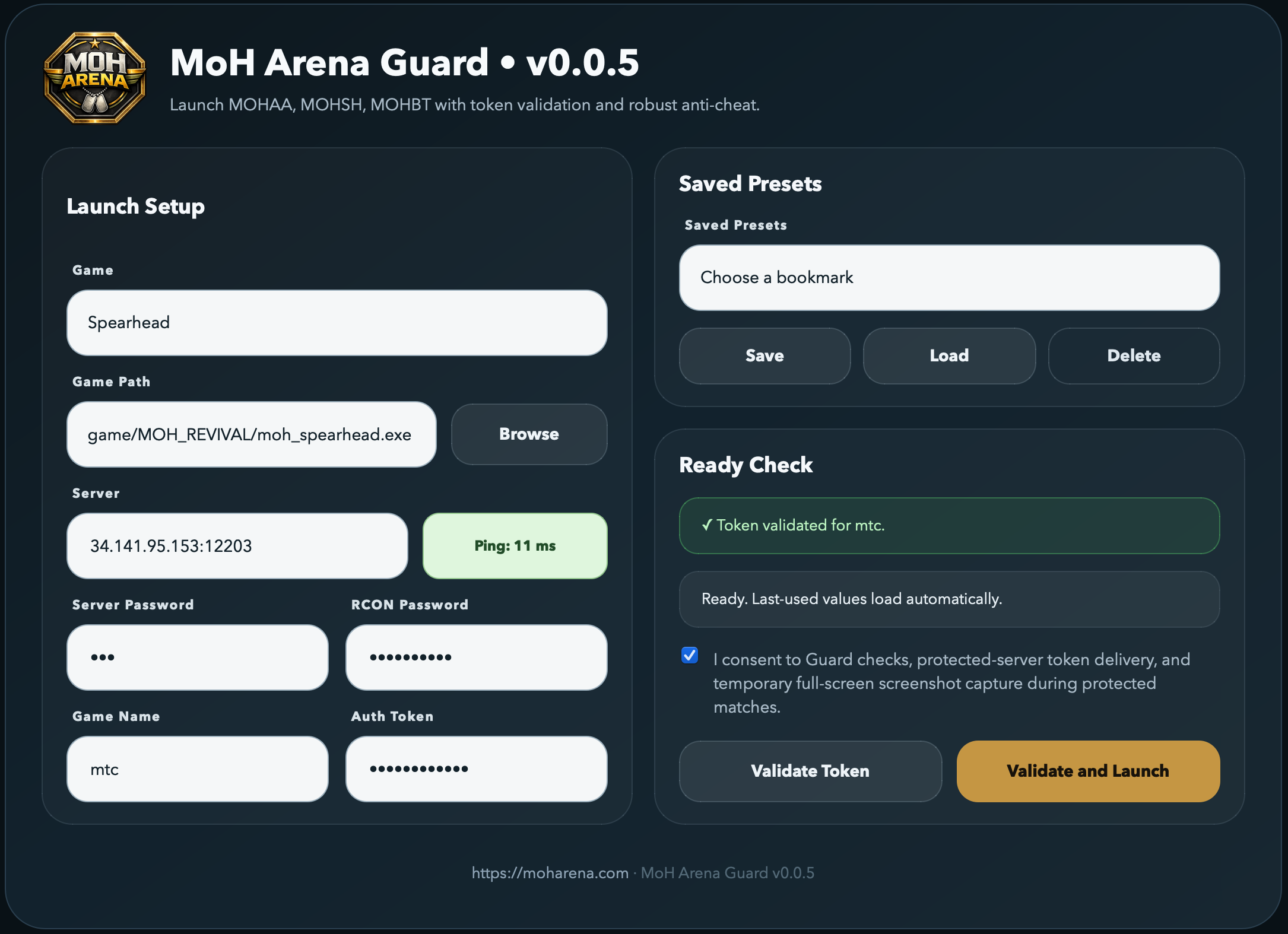
MoH Arena launcher preview

Install, Update & Uninstall

Install

  1. Download a clean game install from Downloads.
  2. Extract the zip and move the MOH_REVIVAL folder wherever you like.
  3. Download the Guard installer above.
  4. Right-click the installer and choose Run as administrator.
  5. Allow permissions, then tick URL Register and Desktop Shortcut.
  6. Open Link Game, copy your auth token, and paste it into Guard.

Update

  1. When Guard offers an automatic update, accept it and let the updater finish.
  2. If auto-update fails, close Guard, download the newest installer from this page, and run it as administrator.
  3. For a clean reinstall, uninstall the old version first, then install the new one.
  4. After updating, reopen Guard as administrator and validate once before joining a protected server.

Uninstall

  1. Close Guard and the game first.
  2. Use the official MoH Arena Guard uninstaller from Windows Apps or the Start Menu entry.
  3. Avoid deleting installation files manually unless an admin asks you to troubleshoot a broken install.
  4. If reinstalling, reboot if Windows says files are still in use, then run the installer as administrator.

Match Usage

  1. Always open Guard with Run as administrator.
  2. Select the game, path to executable, server IP:port, and password shared by an admin or contributor.
  3. Tick the consent box.
  4. Click Validate and Launch.
  5. Keep Guard open while the game is running. It sends heartbeats and handles protected-server authentication.

Troubleshooting

  1. Permission error: run Guard as administrator.
  2. Heartbeat not found: disable your anti-virus temporarily or add a rule exception for Guard.
  3. Process exited: click Validate and Launch again.
  4. Server disconnected: open the game console and type reconnect.
  5. Compliance errors: fix them one by one using the Anti-Cheat rules.
New to MoH Arena? Open Player Guide

Policy

Major violations: unauthorized game files, checksum mismatches, blocked bind/script commands, and tampered launcher heartbeat/session state. Major violations will trigger an automatic kick from protected servers.

Minor violations: plain aliases and competitive cvars outside the published range. Tracked and published in v1 but do not trigger an automatic kick unless the server admin enables stricter policy.

Windows note: run MoH Arena Guard as Administrator before joining protected matches so native process/module checks are not blocked by Windows Defender, firewall, or user-permission limits.

Cheat-ban consequences: players caught cheating are banned and receive a red Cheat Ban badge.

Note: cumulative minor and major violations can lead to a ban.

File Integrity

Every .pk3, executable, and required asset is MD5-checked against the published whitelist before the game is allowed to launch.

Live Heartbeat

A background session pings the website every second. Tampering, process edits, or missing pings surface as major violations in real time.

Bind & Cvar Guard

Allows normal MoH binds like toggle, togglemenu, model selection, and connect, while flagging aliases, exec, vstr, and recoil-style scripting.

Server Presence HUD

Protected servers render an in-game overlay showing "AC Active · N/M players protected" and flag any joiner who is not running the launcher.

Auto-Kick Policy

Server admins can enable kicks for major violations, minor violations, or players without the launcher — with no manual intervention needed.

Privacy First

MoH Arena Guard may capture full-screen screenshots while you are connected to a protected server. Screenshots are resized, compressed, used only for anti-cheat evidence, and automatically deleted after a short retention period.