In-game AC HUD
Drop the HUD PK3 into your main/, mainta/, or maintt/ folder.
Press F9 in-game to see Guard coverage on supported servers.
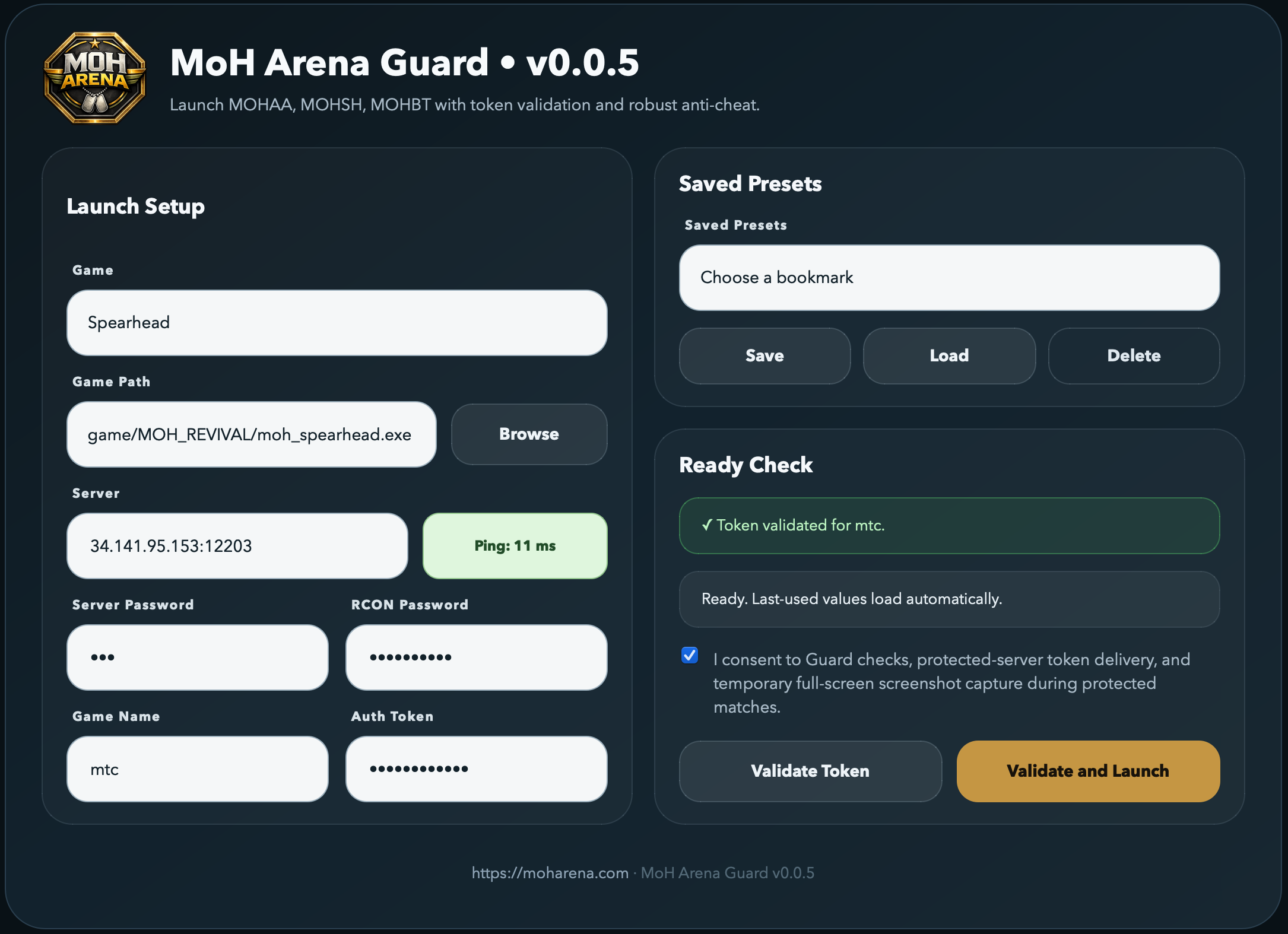
Download the launcher, validate your game files, join protected servers, and keep your session verified while you play.
Drop the HUD PK3 into your main/, mainta/, or maintt/ folder.
Press F9 in-game to see Guard coverage on supported servers.
Guard verifies executables, game modules (DLLs / .so), drivers, and pak archives before launch. Any unexpected file or MD5 mismatch on a monitored path is a major violation.
0645e03ae75b0c5f425525eafa2b6dd2
23aa3230ae58d9cbabe080a108e9d1ea
e80aa854c4b87cc47937ced9576f4e14
306903953cfb21f979c9b828cb406ef5
c22f55102278f7ef7725c68387bc3057
55414ef53eac5307b11172b617550692
d9f3b1fabfed15194db354550586205d
3444d6787520546d85f4113ffde9bd0b
aa6c6e490e50f33a14a53687f0848b8c
596628f1cc273dff9956b91740b6c05b
3b2528bde7732636a6a97bc99dd13583
4cfb7da7421ae4f7b919a1b9d30b5128
df054025c9e845b33b27a99af750f9b9
426f52e41f656cffe071a3b5b060a394
e6f3d4084a63331c0202c3c4ad89babc
b725c0fc7139ba5e16759cffd44c8944
19b425af586ebccebdf6df215126ac4e
db23925862fae28db4dc140f931dd2ab
1fe7721489712e47631f50ae11129815
9ae68d618b5c9412f79bc1cccc1d286a
a5eb6dd22ca7f9098080847ab8aa8444
4961a7b69935c0adbf8e589b4a037391
9449f6ce4148d34eaa10b0832d38bf7b
d0c7b83f5f5ca2094fca334fad527be9
6c96d0ecc8ab0167a8ffab87122fc91d
ba0d892d2f786bcebdf03b0a252b47f3
1195d27a9e9e3356b74fe08eba98de77
d4ac0a76cc4509481fb388b4215cee86
f1e844255b742451b1dc03c5e6a7dd16
3ea6dfebfe969468475d42a918e8f6b8
6159616aab745b11e2760ded73b0bdc7
9ad7f83b8f72714d2d8a9f4d8223607a
06546e0c5345617b22a340c85110b574
9e9db7b49269d486814a2246147107de
cf801b0c003fbaea412ed8f171bedbb7
8eba79f8877ceabf5ae344ccf4dd4d67
cca4793b4d1e303ad546dc46190abe8c
94e0de60cd8f9432b1d3b1010e14075f
ead92787a573bdfc5d7389ddc9367db0
ed4d5fa823f1d8102d4c3a9a6cf18ccf
2ed4b8240f9ee3d94f4e7d075fba777d
81d457a3ec6345e0dd20d86b1b404a22
71ec3324a7d1d29f26db933804c3c78b
1a8578d1c12b0c5efef82977f05443d4
f0cc2b42d21b52f521cefc359d4b7b88
2cd9a8e634f14f92106789ed2f3efbb0
0ad4ab760c0094699ee0f4dd55513edf
bd60c31560121c93dd2239e51d57b571
6793cc874c7cf33fb7b2cbbf191b7662
b4a9db75523446138cbcbcd3f98c8095
9ef47427e7c3f5636f809ac8712a461f
9db0c67f7ce2b613247ebd270ff591cf
4caadd73576eb480d89fce790e992bc8
c7c75bd5af292829e8f4564d535cbd58
1828b18e0e4dce57559f0fd4b0d2fb3a
4bc7de7a22216eb4a64bc57b646483aa
1195d53cdedc83e54c043f625b43b07b
3a2334d7ce61042d4f9e6c6b01e1bcff
172dd011e999bf9d74bf35b63f3b4a07
1e96e77a2b123186986d089e198c8f66
1e2e77461a03f02a9878508a7e035c2f
08ae9d7ee5bb25bf9115fbe4bd071714
fff8f0f1e6f9c2a6f1fb0dc194c5822b
50acbda9a8634a1dd33154c88ee8b506
230b78842357b85f9875e164f34d5a0b
c2741706e58d28e9953ec12c684e2adb
e296529962124ebe5e06d87ad7918c0e
fa7760a3a87ef022768a3aa556a7abaf
d0b75b3262b63d0f170803cfec6f3abe
e53bb87943c61d05a3a4027e9807e849
d35e43caae80445dabb3724c64b53a02
3947754a90cb5cb33e104ff8e2637851
44398b70513d8b24dcfe7514b66625cf
62eeeb5e4328972f4ed45bd6dd124da5
ee14340cab7c189405e45c231e7aa3de
0ab5f133cd41d4e5ba02f6254104a865
e17a7dfe5d2c2fde1dda28912a47ddd1
2519485c8aba5fe70cffea4eb5e11ba8
c334c271d8947534eca24234d8164b36
4215cd5750b274e208741f3b7f5d4ede
271e4e7acb8450780005b86006391692
3df600f929043873466b690795b0f314
f969194c65d9ec75b4143e72eb1670bd
42991562869838f366323fffebc061c0
25aadc63efd9d0841137eb007c088f9e
f80ed34d942496cb5778206e4f11ee54
d949882fe0a760952e9e2c322422ff15
9e9db7b49269d486814a2246147107de
cf801b0c003fbaea412ed8f171bedbb7
8eba79f8877ceabf5ae344ccf4dd4d67
cca4793b4d1e303ad546dc46190abe8c
94e0de60cd8f9432b1d3b1010e14075f
ead92787a573bdfc5d7389ddc9367db0
ed4d5fa823f1d8102d4c3a9a6cf18ccf
2ed4b8240f9ee3d94f4e7d075fba777d
81d457a3ec6345e0dd20d86b1b404a22
71ec3324a7d1d29f26db933804c3c78b
1a8578d1c12b0c5efef82977f05443d4
f0cc2b42d21b52f521cefc359d4b7b88
2cd9a8e634f14f92106789ed2f3efbb0
0ad4ab760c0094699ee0f4dd55513edf
bd60c31560121c93dd2239e51d57b571
6793cc874c7cf33fb7b2cbbf191b7662
b4a9db75523446138cbcbcd3f98c8095
9ef47427e7c3f5636f809ac8712a461f
9db0c67f7ce2b613247ebd270ff591cf
4caadd73576eb480d89fce790e992bc8
c7c75bd5af292829e8f4564d535cbd58
1828b18e0e4dce57559f0fd4b0d2fb3a
4bc7de7a22216eb4a64bc57b646483aa
1195d53cdedc83e54c043f625b43b07b
3a2334d7ce61042d4f9e6c6b01e1bcff
f030b95c358eeed05891e0bbc9b8e361
16fceb0c8410ae87b0c6bae1ae761c5b
099d46871c7b7bbefbea0c72ccd6cea5
c4cd23103785916f723658159e9962b4
e07af969447d25d91c28f5dd00b84adc
c2741706e58d28e9953ec12c684e2adb
e296529962124ebe5e06d87ad7918c0e
fa7760a3a87ef022768a3aa556a7abaf
d0b75b3262b63d0f170803cfec6f3abe
e53bb87943c61d05a3a4027e9807e849
d35e43caae80445dabb3724c64b53a02
0aa859ced5945e11913d5accc2705539
3947754a90cb5cb33e104ff8e2637851
44398b70513d8b24dcfe7514b66625cf
62eeeb5e4328972f4ed45bd6dd124da5
ee14340cab7c189405e45c231e7aa3de
0ab5f133cd41d4e5ba02f6254104a865
e17a7dfe5d2c2fde1dda28912a47ddd1
2519485c8aba5fe70cffea4eb5e11ba8
c334c271d8947534eca24234d8164b36
4215cd5750b274e208741f3b7f5d4ede
271e4e7acb8450780005b86006391692
3df600f929043873466b690795b0f314
f969194c65d9ec75b4143e72eb1670bd
42991562869838f366323fffebc061c0
6063bd41f82d1e5f7e0aac08c8c7e33e
ebf1898c107418d875e9afe89a45c381
0efa9986f55f8010efca6004ac503010
9e9db7b49269d486814a2246147107de
cf801b0c003fbaea412ed8f171bedbb7
8eba79f8877ceabf5ae344ccf4dd4d67
cca4793b4d1e303ad546dc46190abe8c
94e0de60cd8f9432b1d3b1010e14075f
ead92787a573bdfc5d7389ddc9367db0
ed4d5fa823f1d8102d4c3a9a6cf18ccf
2ed4b8240f9ee3d94f4e7d075fba777d
81d457a3ec6345e0dd20d86b1b404a22
71ec3324a7d1d29f26db933804c3c78b
1a8578d1c12b0c5efef82977f05443d4
f0cc2b42d21b52f521cefc359d4b7b88
2cd9a8e634f14f92106789ed2f3efbb0
0ad4ab760c0094699ee0f4dd55513edf
bd60c31560121c93dd2239e51d57b571
6793cc874c7cf33fb7b2cbbf191b7662
b4a9db75523446138cbcbcd3f98c8095
9ef47427e7c3f5636f809ac8712a461f
9db0c67f7ce2b613247ebd270ff591cf
4caadd73576eb480d89fce790e992bc8
c7c75bd5af292829e8f4564d535cbd58
1828b18e0e4dce57559f0fd4b0d2fb3a
4bc7de7a22216eb4a64bc57b646483aa
1195d53cdedc83e54c043f625b43b07b
3a2334d7ce61042d4f9e6c6b01e1bcff
f2ad44c4de4e7ef2b9411afe957e0527
46b5226a8d940f5ee7101dd75b7be48a
a3af0f4ba06a5d752105d0c237ee4db8
9ef5bfc0588ba782e41923f81f737fb4
c2741706e58d28e9953ec12c684e2adb
e296529962124ebe5e06d87ad7918c0e
fa7760a3a87ef022768a3aa556a7abaf
d0b75b3262b63d0f170803cfec6f3abe
e53bb87943c61d05a3a4027e9807e849
d35e43caae80445dabb3724c64b53a02
0aa859ced5945e11913d5accc2705539
3947754a90cb5cb33e104ff8e2637851
44398b70513d8b24dcfe7514b66625cf
62eeeb5e4328972f4ed45bd6dd124da5
ee14340cab7c189405e45c231e7aa3de
0ab5f133cd41d4e5ba02f6254104a865
e17a7dfe5d2c2fde1dda28912a47ddd1
2519485c8aba5fe70cffea4eb5e11ba8
c334c271d8947534eca24234d8164b36
4215cd5750b274e208741f3b7f5d4ede
271e4e7acb8450780005b86006391692
3df600f929043873466b690795b0f314
f969194c65d9ec75b4143e72eb1670bd
42991562869838f366323fffebc061c0
1311f6ff2dc889533eef0628c451b02a
578ebc049301d46df3e410999b824c51
5e47d5d00c3e15b5cd8e76e499f0b12d
f8ca6fd4d6740098845d585477e18efd
4d617faceb9c11ae1b774ff379ffd789
ae1a2411ab5a35b039225a7560c25b84
22a54539925f38df939be9be8d93f228
d79997e28cefa60c2005ab09f7c10391
9fb041c26de35f876d0351df0fd18462
489f8c5b5efcaee49a3c4b3ee8fcc718
9bd5cf6c6f77f1929678ebbfe571ad23
a41ee7c9a7cac1d82293d0958443eff2
ab2a7654ffa6bc2de70668c95d8ac911
2cbe888723b40863c4a3b52ee4a4013c
e1141db310d639eaee53ec5feba0d731
Competitive cvar ranges and bind rules are public. The launcher snapshots your cvars and binds at start; anything outside the allowed range or any bind that tries to script logic is reported.
bind f11 "togglemenu mohsh_pl_menu"bind f "say LOL"bind 1 "useweaponclass pistol"bind home "connect 1.2.3.4:12203"bind k "dm_playermodel allied_ranger"alias recoil "..."bind mouse1 "+attackprimary; +lookdown"bind f2 "exec recoil.cfg"bind x "seta foo 1"bind v "vstr recoil_script"L Latched. C Cheat-protected.
cg_3rd_person
C
Third-person view
cg_acidtrip
C
Acid-trip view effect
cg_cameraverticaldisplacement
Third-person camera height offset
cg_fov
Field of view
cg_hidetempmodels
Hide temporary models
cg_nopredict
Disable client prediction
cg_shadows
Player shadows
cg_showemitters
Show active emitters
cg_showevents
Show client events
cg_showmiss
Show prediction misses
cg_smoothClientsTime
Client smoothing time
cl_altbindings
Alt keybind layer
cl_ctrlbindings
Ctrl keybind layer
cl_maxpackets
Max client packets
cl_pitchspeed
Pitch speed
cl_timeNudge
Client time offset
com_maxfps
Maximum FPS
g_subtitle
Subtitles
r_ambientScale
C
r ambientScale
r_colorMipLevels
L
r colorMipLevels
r_colorbits
L
r colorbits
r_debuglines_depthmask
r debuglines depthmask
r_directedScale
C
r directedScale
r_dlightBacks
r dlightBacks
r_drawbrushes
C
r drawbrushes
r_drawbrushmodels
C
r drawbrushmodels
r_drawentities
C
Entity rendering
r_drawentitypoly
C
r drawentitypoly
r_drawspherelights
C
r drawspherelights
r_drawsprites
C
r drawsprites
r_drawstaticmodelpoly
C
r drawstaticmodelpoly
r_drawterrain
C
r drawterrain
r_drawworld
C
World rendering
r_entlightmap
C
r entlightmap
r_ext_compiled_vertex_array
L
r ext compiled vertex array
r_ext_gamma_control
L
r ext gamma control
r_ext_texture_env_add
L
r ext texture env add
r_ext_texture_env_combine
L
r ext texture env combine
r_facePlaneCull
r facePlaneCull
r_farplane
C
r farplane
r_farplane_nocull
C
r farplane nocull
r_farplane_nofog
C
r farplane nofog
r_fastentlight
r fastentlight
r_fastsky
Fast sky
r_flareFade
C
r flareFade
r_flareSize
C
r flareSize
r_flares
r flares
r_fullbright
L
C
Fullbright lighting
r_gamma
r gamma
r_glDriver
L
r glDriver
r_ignoreFastPath
L
r ignoreFastPath
r_ignorehwgamma
L
r ignorehwgamma
r_intensity
L
r intensity
r_lerpmodels
r lerpmodels
r_light_int_scale
Light intensity debug scale
r_light_nolight
r light nolight
r_light_showgrid
C
r light showgrid
r_lightcoronasize
Light corona size
r_lightmap
C
Lightmap-only rendering
r_lockpvs
C
r lockpvs
r_lodCurveError
C
Curve LOD error
r_mapOverBrightBits
L
r mapOverBrightBits
r_nobind
C
r nobind
r_nocull
C
Disable culling
r_nocurves
C
Disable curves
r_novis
C
PVS visibility bypass
r_overbrightbits
L
r overbrightbits
r_picmip
L
Texture detail level
r_primitives
r primitives
r_showSmp
C
r showSmp
r_showcull
C
r showcull
r_shownormals
C
r shownormals
r_showsky
C
r showsky
r_showtris
C
Triangle wireframe
r_singleshader
L
C
r singleshader
r_static_shadermultiplier0
r static shadermultiplier0
r_static_shadermultiplier1
r static shadermultiplier1
r_static_shadermultiplier2
r static shadermultiplier2
r_static_shadermultiplier3
r static shadermultiplier3
r_subdivisions
L
Curve subdivisions
r_useglfog
r useglfog
r_vertexlight
L
Vertex lighting
r_znear
C
Near clip plane
s_initsound
Initialize sound
s_show_num_active_sounds
Show active sounds
ui_Accuracy
Accuracy HUD stat
ui_HeadShots
Headshot HUD stat
+attackprimary+attacksecondary+back+forward+leanleft+leanright+lookdown+lookup+movedown+moveleft+moveright+moveup+scores+speed+usecinematicconnectdisconnectdm_playergermanmodeldm_playermanmodeldm_playermodelholsterinstamsg_mainkillloadgamemessagemodemessagemode_allmessagemode_privatemessagemode_teampausepushmenupushmenu_dmpushmenu_sppushmenu_teamselectpushmenu_weaponselectquitreloadsavegamesaysayprivatesayteamscreenshotteamsaythxtoggletoggleconsoletoggleitemtogglemenuui_getplayermodeluseweaponclassvid_restartvoteweapdropweapnextweapprevwisper
aliasexecsetsetasetssetuvstr
Guard collects only what the anti-cheat needs to do its job, and asks for consent on first run. Below is the full list — no surprises.
Consent is requested on first run and recorded on the server with a timestamp and your account ID. Withdraw at any time by uninstalling Guard. To request deletion of stored session/violation history, contact an admin on Discord.
Quick answers for installing, running, and sharing useful debug information when something does not behave.
In Guard, click Export Support Report. It saves a support-*.txt file and copies the same report to your clipboard. Share that report with the host first, because it includes the useful tail of launcher.log and anti_cheat.log while redacting auth tokens and passwords.
If an admin asks for raw logs, they are usually in C:\YOUR_USERNAME\.moharena-launcher\. Replace YOUR_USERNAME with your Windows username. Send only the relevant recent lines and never share your auth token, server password, RCON password, or private server token.
moh_spearhead.exe.seta, removes unsafe script-style binds, and can restore safe default binds where possible.No. Guard is required for protected servers. Regular public servers can still be launched normally, and Guard can launch/report without enforcing protected-server checks when the server is not known to require Guard.
Windows can block process, module, file, and screenshot checks unless Guard has enough permission. Running as administrator gives the native helper the access it needs and prevents many false failures.
Read the violation details in the launcher. Safe fixes usually mean normalizing your profile cfg or moving custom PK3s out of monitored folders. If the server allows reporting instead of kicking, you may still be able to launch and report the issue to the host.
The HUD PK3 shows Guard coverage while you are in-game on supported servers. Download it from this page, drop it into main/, mainta/, or maintt/, then press F9 in-game. Newer Guard versions add the F9 bind automatically when the HUD PK3 is present.
No. Guard focuses on the selected Medal of Honor install, the game process, loaded game modules, competitive cvars/binds, and protected-session evidence. It does not collect browsing history, clipboard data, keystrokes, or unrelated personal files.